Multi-cluster observability with decentralized data storage
Multi-cluster and multi-cloud setups are increasingly common, and observability quickly becomes more complex in these environments.
In some cases, centralizing all telemetry in a single cluster works well. In others, data must remain local to each cluster due to cost, compliance, or latency requirements.
Regardless of where telemetry is stored, you still need a unified, cross-cluster view and the ability to perform root cause analysis across clusters. This guide shows how to achieve exactly that with Coroot.
Architecture overview
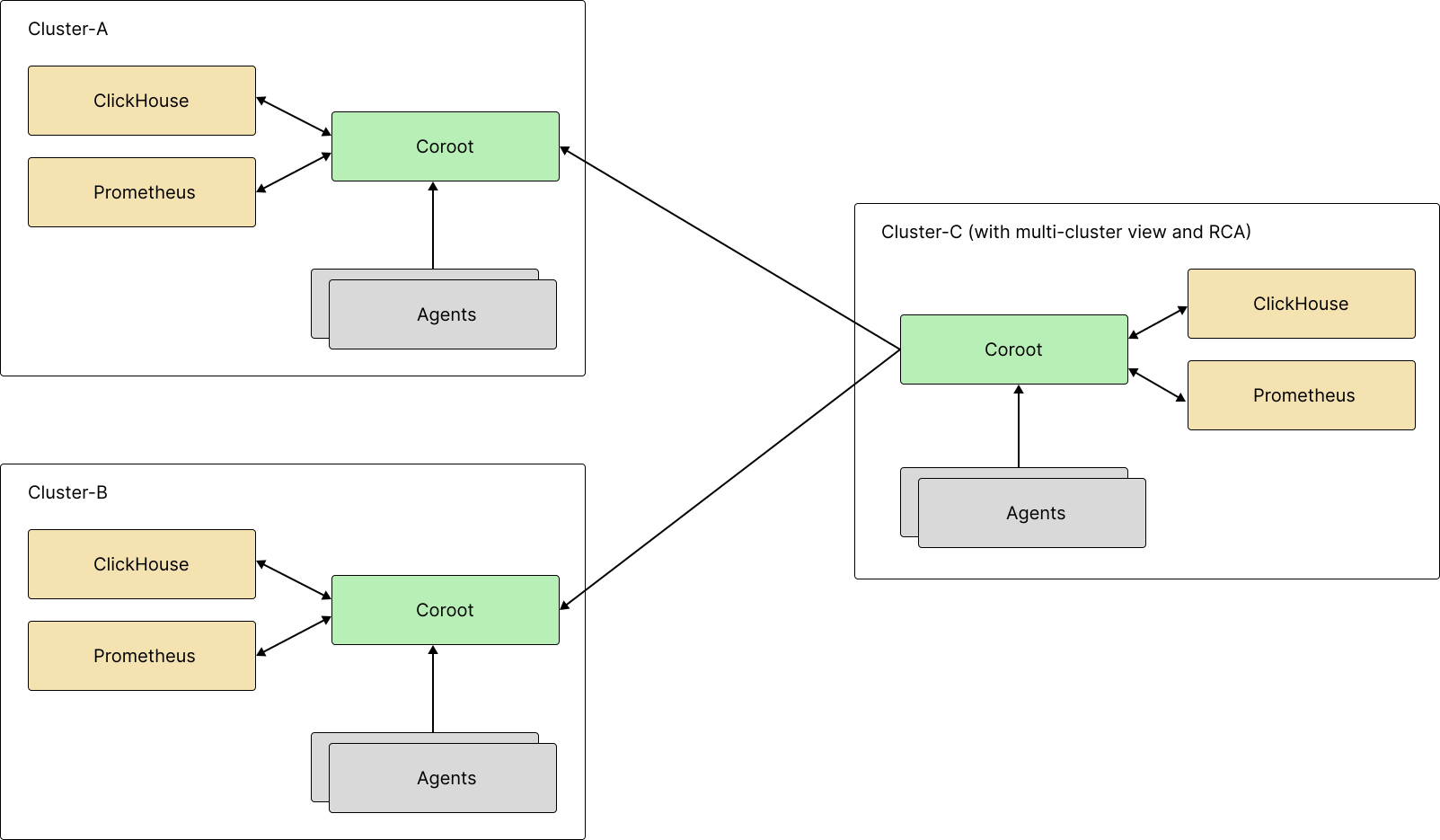
This guide walks through a three-cluster setup:
- Cluster A: Coroot with local storage
- Cluster B: Coroot with local storage
- Cluster C: Coroot with local storage + acting as an aggregation hub
Cluster C connects to clusters A and B using remoteCoroot and creates a multi-cluster project that spans all three clusters,
while telemetry data remains stored locally in each cluster.
Prerequisites
- Three Kubernetes clusters with
kubectlcontexts (examples below usecluster-a,cluster-b,cluster-c). - Helm 3.
- Public (or at least cluster-c-reachable) URLs for Coroot in clusters A and B.
Step 1: Install Coroot in Cluster A
Install the Coroot Operator for Kubernetes:
kubectl config use-context cluster-a

helm repo add coroot https://coroot.github.io/helm-charts
helm repo update coroot
helm install -n coroot --create-namespace coroot-operator coroot/coroot-operator
Create the Coroot custom resource (coroot.yaml):
apiVersion: coroot.com/v1
kind: Coroot
metadata:
  name: coroot
  namespace: coroot
spec:
  metricsRefreshInterval: 15s
  # Coroot EE users: add the license block below. That's the only spec change required.
  # enterpriseEdition:
  #   licenseKeySecret:
  #     name: coroot-ee-license
  #     key: license-key
  service:
    nodePort: 30001 # expose Coroot via NodePort so it's reachable via any node IP
    type: NodePort
  apiKeySecret: # agents in this cluster will use this secret's API key to send telemetry
    name: coroot
    key: agent-api-key
  projects:
    - name: prod-a # create the project for cluster A
      apiKeys: # if the secret doesn't exist, the operator creates it and generates API keys
        - description: API key used by Coroot agents to ingest telemetry data
          keySecret:
            name: coroot
            key: agent-api-key
        - description: API key used by another Coroot instance to access data for a multi-cluster view
          keySecret:
            name: coroot
            key: multi-cluster-api-key
Apply the configuration:
kubectl apply -f coroot.yaml
Verify that all components are running:
kubectl get pods -n coroot
NAME                                    READY   STATUS    RESTARTS   AGE
coroot-clickhouse-keeper-0              1/1     Running   0          91s
coroot-clickhouse-keeper-1              1/1     Running   0          84s
coroot-clickhouse-keeper-2              1/1     Running   0          78s
coroot-clickhouse-shard-0-0             1/1     Running   0          91s
coroot-cluster-agent-69cd866558-zsmr9   2/2     Running   0          92s
coroot-coroot-0                         1/1     Running   0          92s
coroot-node-agent-pvk78                 1/1     Running   0          92s
coroot-operator-5d8d7c55b5-lp588        1/1     Running   0          98s
coroot-prometheus-74c87c4d75-r9bxf      1/1     Running   0          92s
At this point, Coroot is running in cluster A and reachable via any node IP. All telemetry data (metrics, logs, traces, and profiles) is stored locally in the cluster.
Step 2: Install Coroot in Cluster B
Repeat Step 1 in cluster B, but use a different project name:
apiVersion: coroot.com/v1
kind: Coroot
metadata:
  name: coroot
  namespace: coroot
spec:
  metricsRefreshInterval: 15s
  # Coroot EE users: add the license block below. That's the only spec change required.
  # enterpriseEdition:
  #   licenseKeySecret:
  #     name: coroot-ee-license
  #     key: license-key
  service:
    nodePort: 30001 # expose Coroot via NodePort so it's reachable via any node IP
    type: NodePort
  apiKeySecret: # agents in this cluster will use this secret's API key to send telemetry
    name: coroot
    key: agent-api-key
  projects:
    - name: prod-b # create the project for cluster B
      apiKeys: # if the secret doesn't exist, the operator creates it and generates API keys
        - description: API key used by Coroot agents to ingest telemetry data
          keySecret:
            name: coroot
            key: agent-api-key
        - description: API key used by another Coroot instance to access data for a multi-cluster view
          keySecret:
            name: coroot
            key: multi-cluster-api-key
Apply the configuration and verify the pods as before. Coroot in cluster B will also store all telemetry locally.
Step 3: Collect remote access API keys
Cluster C needs API keys to read data from clusters A and B. Fetch the multi-cluster-api-key values and store them in a single secret in cluster C:
kubectl config use-context cluster-a
PROD_A_KEY=$(kubectl get secret -n coroot coroot -o jsonpath='{.data.multi-cluster-api-key}' | base64 -d)

kubectl config use-context cluster-b
PROD_B_KEY=$(kubectl get secret -n coroot coroot -o jsonpath='{.data.multi-cluster-api-key}' | base64 -d)

kubectl config use-context cluster-c
kubectl create secret generic -n coroot remote-coroot-clusters \
  --from-literal=prod-a="${PROD_A_KEY}" \
  --from-literal=prod-b="${PROD_B_KEY}"
Step 4: Install Coroot in Cluster C
Install the Coroot Operator for Kubernetes:
kubectl config use-context cluster-c

helm repo add coroot https://coroot.github.io/helm-charts
helm repo update coroot
helm install -n coroot --create-namespace coroot-operator coroot/coroot-operator
Create the Coroot custom resource (coroot.yaml):
apiVersion: coroot.com/v1
kind: Coroot
metadata:
  name: coroot
  namespace: coroot
spec:
  metricsRefreshInterval: 15s
  # Coroot EE users: add the license block below. That's the only spec change required.
  # enterpriseEdition:
  #   licenseKeySecret:
  #     name: coroot-ee-license
  #     key: license-key
  service:
    nodePort: 30001 # expose Coroot via NodePort so it's reachable via any node IP
    type: NodePort
  apiKeySecret: # agents in this cluster will use this secret's API key to send telemetry
    name: coroot
    key: agent-api-key
  projects:
    - name: prod-a
      remoteCoroot:
        url: https://coroot-a.example.com
        apiKeySecret:
          name: remote-coroot-clusters
          key: prod-a
        metricResolution: 15s
    - name: prod-b
      remoteCoroot:
        url: https://coroot-b.example.com
        apiKeySecret:
          name: remote-coroot-clusters
          key: prod-b
        metricResolution: 15s
    - name: prod-c
      apiKeys:
        - description: API key used by Coroot agents to ingest telemetry data
          keySecret:
            name: coroot
            key: agent-api-key
    - name: prod-global
      memberProjects:
        - prod-a
        - prod-b
        - prod-c
Next, apply the spec:
kubectl apply -f coroot.yaml
Validate that the operator deployed Coroot components:
kubectl get pods -n coroot
Result
Coroot in cluster C now exposes the aggregated prod-global project. It provides a unified view of applications across all three clusters and their interactions, while telemetry data remains stored independently in each cluster.